A non-profit runs a small team that carries a heavy load: social researchers, accountants, programme coordinators and charity-shop staff, each with a salary, leave, advances and documents. When non-profit payroll lives in spreadsheets apart from the books, the payroll run is late and the finance manager can't tell what each department costs. In this article we show how a charity can follow its staff and salaries from one system, through two real screens from Najeed.
Why does manual management wear a charity's team down?
Charities need more precision than most, because the board and the regulators ask where the money went. The usual symptoms when teams rely on spreadsheets:
- A payroll run rebuilt from scratch every month: it eats the accountant's time on work that repeats.
- Advances with no clear record: nobody knows how much an employee still owes and how much has been repaid.
- Salaries outside the journal entries: the accountant has to key the figures again into the books.
- No picture of cost by department: it is hard to charge each programme its true cost.
What does HR cover in Najeed?
The add-on is built on Saudi labour law and runs inside Najeed itself. It includes the employee file with documents, dependants, insurance, visas, letters and disciplinary records; mobile check-in and check-out within a geofence set for each work site; and leave with balances, requests and approvals. Payroll covers payroll runs, advances and salary items with accounting entries, plus Saudi requirements such as social insurance, end-of-service benefits, wage protection, Saudization and overtime. Employees also get self-service: they request leave or a letter and see their payslip from their phone.
The Payroll dashboard: cost and advances at a glance
The Payroll dashboard shows the period you pick: this month, this quarter, this year or the last 12 months.
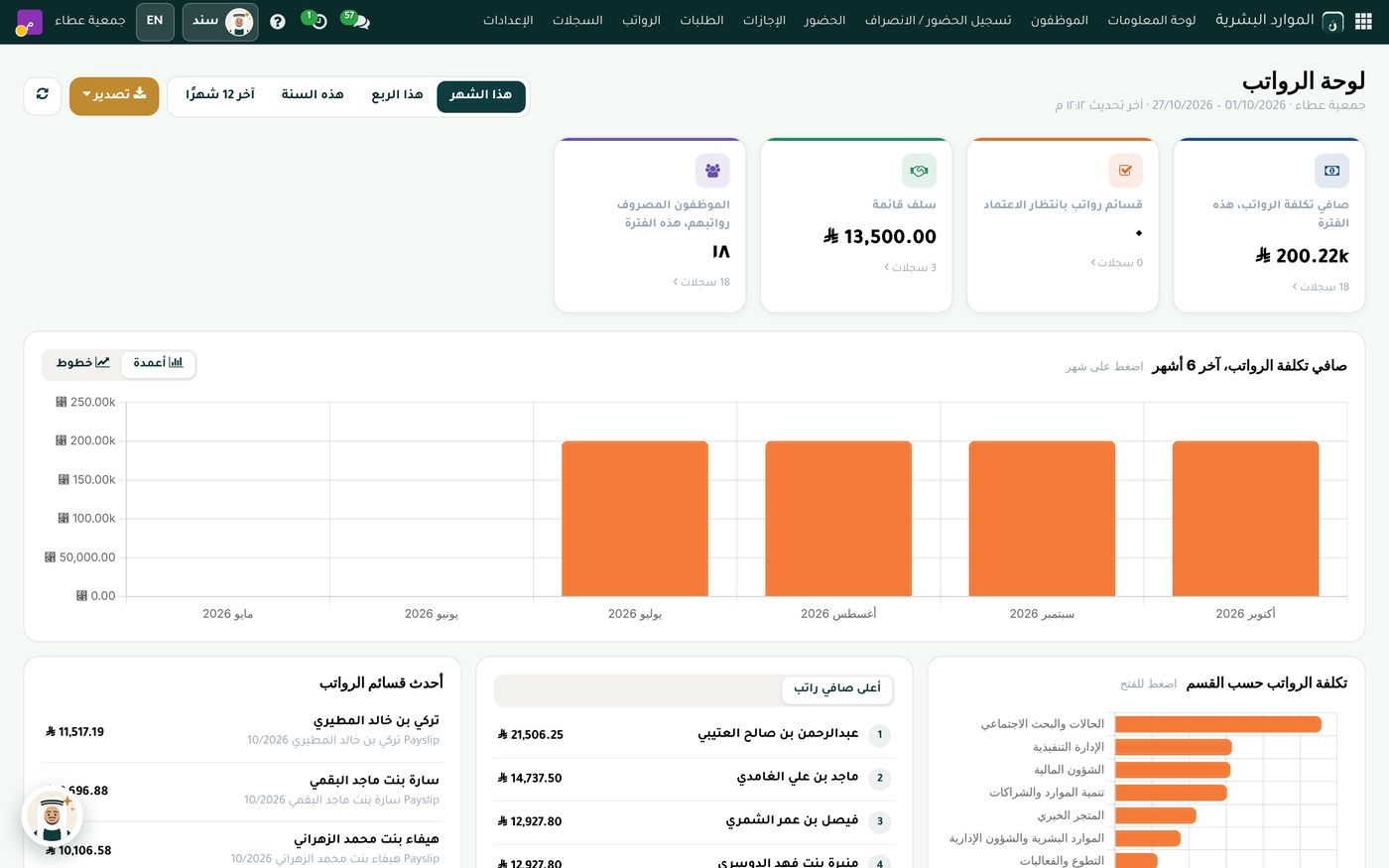
In this demo screen, net payroll cost for the period is 200.22k across 18 records, and 18 employees were paid. The outstanding advances card shows 13,500.00 across 3 records, while payslips awaiting approval number zero. Under the cards, a bar chart of net cost over the last 6 months shows the last four months, July to October 2026, at a similar level, followed by lists of the latest payslips and the highest net salaries, and a chart of payroll cost by department. In this data, Case Management and Social Research leads the other departments in cost.
The screen helps in three ways: it shows what payroll actually costs, it lets you follow advances before they pile up, and it shows which payslips are waiting for approval before payday. There is also an export button at the top of the dashboard.
Payroll runs and advances with accounting entries
When salaries are calculated in the same system that holds the books, the payroll run becomes a journal entry with no re-keying. This link matters especially for charities, because payroll cost shows up by department with no manual consolidation. To understand the accounting foundation, read The Unified Chart of Accounts for Civil Associations: How to Apply It in Practice. As for advances, the outstanding balance and the number of records appear on the Payroll dashboard.
The HR dashboard: who works in the charity?
The HR dashboard answers a different question: how is the team made up?
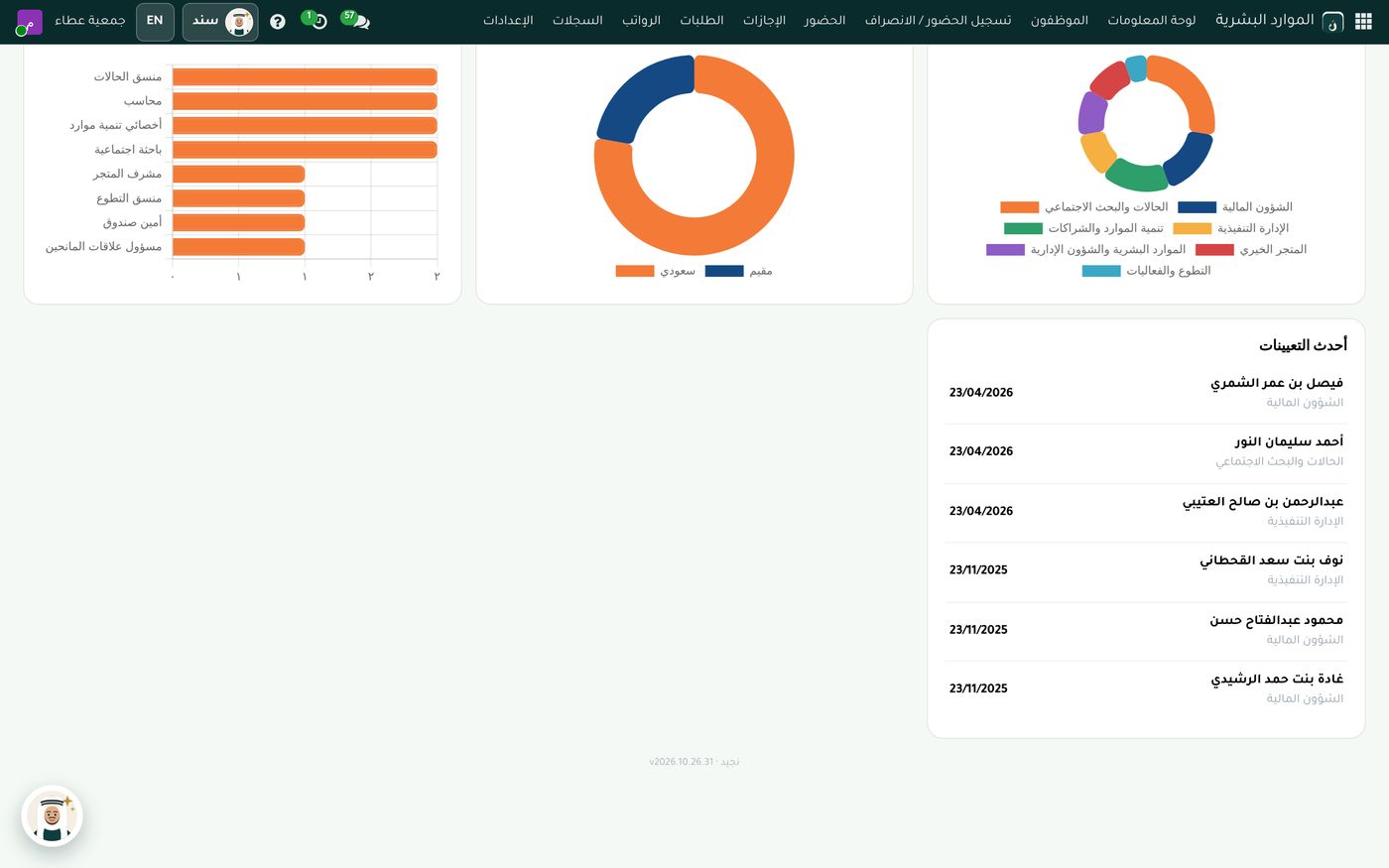
The screen has a bar chart of employees by job title. Case coordinator, accountant, resource development specialist and social researcher each have two employees, while the other titles, such as store supervisor, volunteer coordinator, cashier and donor relations officer, have one each. Beside it is a doughnut chart of Saudis versus expatriates, with Saudis in the majority in this data, another for employees by department with a colour for each department, and a list of the latest hires with department and date. When Saudization is visible like this, management doesn't need to gather the numbers by hand whenever someone asks.
Attendance, leave and self-service
The charity records attendance from the employee's phone by face or fingerprint, and a check-in is accepted only inside the zone set for the work site, which suits a charity with an office, a shop and events in different places. Leave requests are logged and approved in the system, and employees see their payslip without going to the accountant. Fewer verbal requests, and the paperwork stays in one place.
How to get started
- Enter employee files with their documents and departments first.
- Set up salary items and advances before the first payroll run.
- Review payslips awaiting approval on the dashboard before payday.
- Open the HR dashboard when you prepare the Saudization report or a board meeting.
For details of the add-on, see HR and Payroll in Najeed.
Summary
HR in a charity is more than files: it is a cost charged to programmes and reviewed by the board. When employee files, payroll, advances and accounting entries come together in one system, the finance manager knows what was paid and to whom, and the director sees how the team is made up. The Role8 team will gladly show you this add-on in Najeed on demo data so you can judge it against your own charity.
Try HR and payroll in Najeed
Try Najeed with demo data, or contact us and we'll set up the system for you.